How to measure a TV VESA pattern yourself
Quick answer
Measure center-to-center between the 4 threaded holes on the TV's back: the horizontal distance is the first number, the vertical distance the second, both in millimeters — 400 mm across and 300 mm down is VESA 400×300. The whole job takes about 5 minutes with a tape measure. The one mistake to avoid: measuring hole edges instead of hole centers, which reads 5–10 mm short.
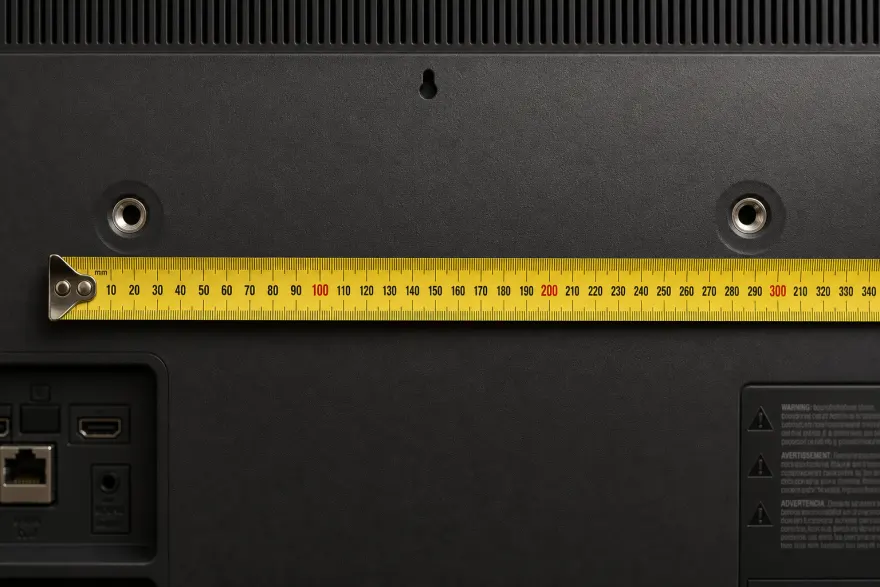
The 3 steps
- Find the four threaded holes. Lay the TV screen-down on a blanket on a flat surface, or work in place if it is on a stand. Locate the 4 threaded holes on the back panel — on many TVs they hide under plastic plugs or stickers; pop them out with a fingernail or a plastic pry tool.
- Measure horizontally, center-to-center. With a tape measure or ruler, measure from the CENTER of one upper hole to the CENTER of the other upper hole, in millimeters. Edge-to-edge measuring is the #1 mistake — it reads 5–10 mm short. Typical results: 100, 200, 300, 400 or 600 mm.
- Measure vertically and combine. Measure from the center of an upper hole straight down to the center of the lower hole on the same side. Combine both numbers as width × height: e.g. 400 mm across and 300 mm down = VESA 400×300. If your numbers land 2–3 mm off a standard value, round to the standard — tape flex accounts for it.
Standard patterns to match against
| Pattern (mm) | In inches | Typical screen sizes |
|---|---|---|
| 100×100 | 3.9×3.9 | 19–32" |
| 200×200 | 7.9×7.9 | 32–55" |
| 300×200 | 11.8×7.9 | 40–60" (common on OLEDs) |
| 300×300 | 11.8×11.8 | 43–65" |
| 400×300 | 15.7×11.8 | 50–75" |
| 400×400 | 15.7×15.7 | 55–85" |
| 600×400 | 23.6×15.7 | 70–98" |
Typical, not guaranteed — the same diagonal ships with different patterns. Our VESA Checker gives the exact value for verified models.
Common mistakes
- Measuring edge-to-edge instead of center-to-center (reads ~5–10 mm short).
- Reading inches off the tape and reporting them as millimeters.
- Missing plastic plugs — if you only find 2 holes, the other 2 are probably capped.
- Using soundbar-bracket holes that don't form a symmetric rectangle around the panel center.
Frequently asked questions
Do I measure in inches or millimeters?
Millimeters — the VESA standard is metric, and every mount lists its range in mm. If your tape only shows inches, multiply by 25.4: e.g. 15.75 in ≈ 400 mm. Measuring in inches and forgetting to convert is a common source of wrong mount orders.
My measurement is a few mm off a standard size — which is right?
Round to the nearest standard: patterns come in fixed steps (75, 100, 200, 300, 400, 600 mm). A reading of 397 mm is a 400 mm pattern with tape flex. If you are 20+ mm off every standard value, re-measure center-to-center — you likely measured hole edges.
What if my TV has more than four holes?
Some TVs expose two patterns (e.g. 200×200 and 400×400) or extra holes for a soundbar bracket. Use the four holes forming a symmetric rectangle around the panel center, and prefer the larger pattern for heavy TVs if your mount supports both.
Can I measure without taking the TV off the wall or stand?
Yes, if you can see the back: measure the exposed rear holes in place. On an already-mounted TV, the bracket usually covers them — check the model page instead by reading the model number from the sticker, or from Settings → Support → About.
Sources
Next: which screws your TV takes (M4/M6/M8), or look your model up in the VESA Checker.