VESA screw sizes: M4, M6, M8 — and safe lengths
Quick answer
VESA mount screws — the bolts that fasten a bracket to the TV's rear holes — come in three metric threads: M4 (4 mm, mostly under 32-inch), M6 (6 mm, the most common on 40–65-inch sets) and M8 (8 mm, larger panels and all recent Samsung sizes). Length is the dangerous variable: a bolt that runs deeper than the TV's threaded boss can crack the panel. Your TV's documented thread and length are on its model page in our database.
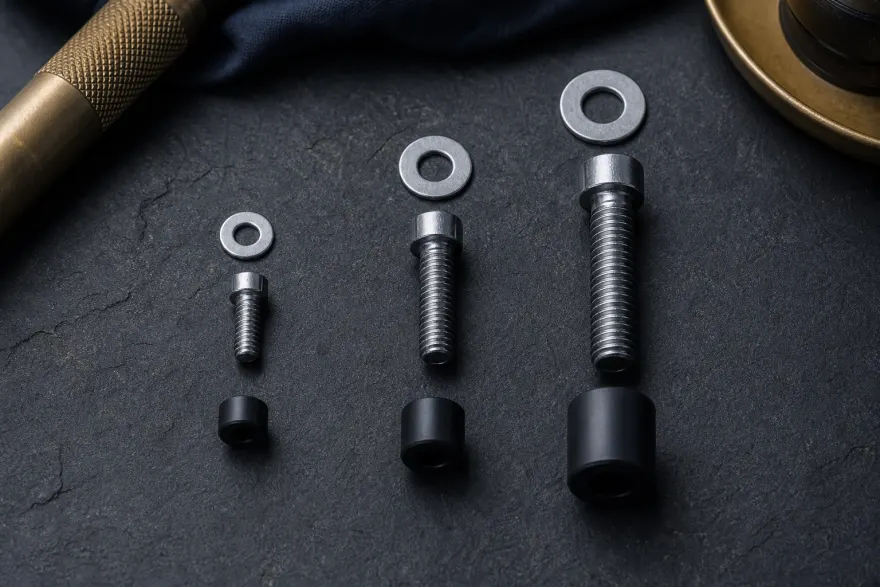
VESA screw size chart: the three threads at a glance
| Thread | Diameter | Typical TVs | Common lengths |
|---|---|---|---|
| M4 | 4 mm (≈5/32") | Monitors and TVs under 32", VESA 75/100 patterns | 8–12 mm |
| M6 | 6 mm (≈15/64") | Most 40–65" LG, TCL, Hisense, Sony, Vizio | 10–20 mm |
| M8 | 8 mm (≈5/16") | Samsung TVs of most sizes; many 70"+ panels | 20–45 mm |
Real examples from our database: the Samsung UN65TU7000 documents M8 × 20–22 mm; the TCL 55S455 documents M6 × 12 mm.
Length: the rule that saves panels
The safe length is the TV's documented screw length plus the thickness of anything between the bracket and the TV (bracket plate, washers, spacers). Two failure modes:
- Too long: the bolt bottoms out — the bracket never clamps, or the tip presses into internals. If a bolt stops before the head seats, stop turning.
- Too short: fewer than ~5 full turns of engagement. As a rule of thumb, thread engagement should be at least the bolt's diameter (e.g. 6 mm deep for M6).
Hand-test first: thread each bolt into the bare TV by hand, count the turns until it seats, then add the bracket and confirm it still seats with the same feel. Any binding or early stop means wrong length.
VESA spacers: when you need them
VESA spacers (standoffs) are rigid sleeves that sit between the bracket and the TV so the bolts clamp something solid instead of bending the plate or crushing the housing. Three situations call for them:
- Recessed holes: the holes sit in wells — the bracket needs standoffs to sit flat (check your model page for a “recessed holes” note).
- Curved or stepped backs: spacers level the bracket so all four bolts load evenly.
- Cable clearance: ports directly behind the plate need 5–10 mm of standoff to avoid pinching cables.
Use rigid spacers (metal or hard nylon), never stacks of soft washers, and add the spacer height to your bolt length.
Double-check before buying
- Confirm the thread on your model page or manual — never by forcing a bolt.
- Measure the total stack (bracket + washer + spacer) and add it to the documented length.
- All four bolts identical, each with the same washers and spacers.
Frequently asked questions
How do I tell M4, M6 and M8 apart without a gauge?
By shank diameter: M4 is 4 mm (about 5/32 in), M6 is 6 mm (just under 1/4 in), M8 is 8 mm (about 5/16 in). Hold the bolt against a ruler, or test-thread it by hand — the correct size threads in smoothly with zero force. Never force a bolt into a TV insert.
What happens if the screw is too long?
It bottoms out inside the boss before the head clamps the bracket, so the mount stays loose no matter how hard you torque it — or worse, the tip presses into internal components and cracks the panel. If a bolt stops early, remove it and add washers/spacers or use a shorter bolt.
Can I use the screws that came with my old mount?
Only if the thread matches your new TV and the length still clears any recess or spacer stack. Threads are standard, but hole depth differs between TVs — a bolt that was right for a 2018 panel can be 5 mm too long for a 2023 one. Hand-test before final install.
Do all four screws need to be identical?
Yes. Mixing lengths concentrates the load on the two screws that seat deepest, roughly halving the effective holding strength. Buy or use a matched set of four, with identical washers and spacers on each corner.
What are VESA spacers and do I need them?
Spacers are rigid standoff sleeves placed between the mount plate and the TV. You need them when the holes are recessed, the back is curved or stepped, or ports sit directly behind the plate. Use metal or hard-nylon spacers of equal height on all four bolts, and add that height to the screw length — never substitute stacks of soft washers.
Sources
- Per-model screw specs cited on each model page (manufacturer mounting guides).
Look up your TV's documented screws in the VESA Checker, or read what to do when patterns don't match.