VESA floor stands, pole mounts & tripods: mounting without a wall
Quick answer
Every option here bolts to the same 4 threaded holes a wall bracket uses, so the two familiar rules carry over unchanged: the plate must cover your screen's exact VESA pattern, and the rating must beat the screen's stand-free weight with margin. A tabletop pedestal replaces lost factory feet, a floor stand or rolling cart frees you from studs and masonry entirely, a pole clamp grips existing tubing, and a tripod adapter makes a screen portable. Your screen's exact pattern and weight are on its model page.
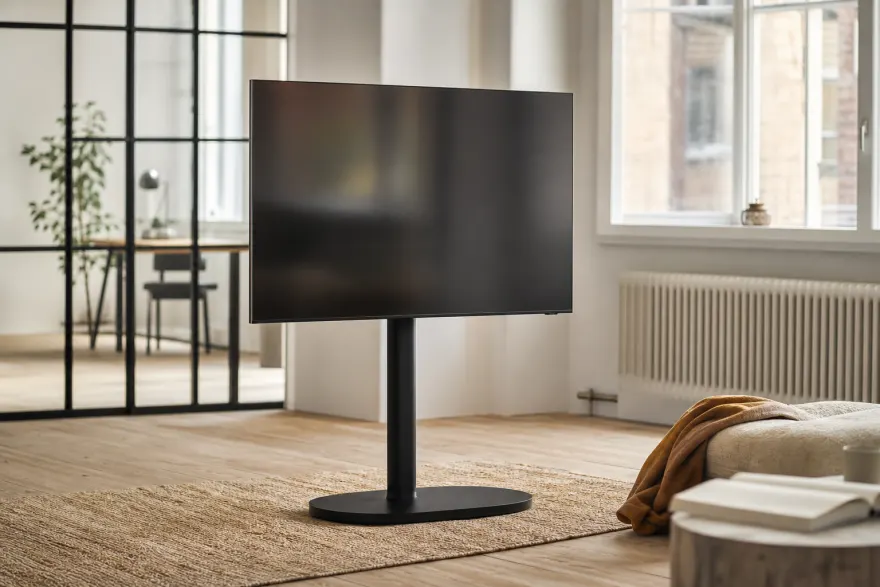
The five wall-free form factors
| Form factor | Typical VESA range | Best for |
|---|---|---|
| Tabletop pedestal stand | 200×200–600×400 | Replacing factory feet that don't fit the console |
| Floor stand (fixed base) | 75×75–600×400 | Rentals, brick/concrete walls, corner placements |
| Rolling cart | 200×200–600×400 | Conference rooms, classrooms, screens that move daily |
| Pole / pipe clamp | 75×75–400×400 | Kiosks, sim rigs, workbenches with existing tubing |
| Tripod adapter or display tripod | 75×75–400×400 | Presentations, events, temporary setups |
Ranges are what the categories commonly list — an individual product's box quotes its own limits, and those are the numbers to match against your screen.
Tabletop pedestal stands: the factory-feet fix
A pedestal bolts into the rear VESA holes and puts a single column under the screen — the standard fix when a TV's factory feet spread wider than the console. Model pages here list the factory stand footprint where the manufacturer publishes it, so you can check the feet-versus-furniture problem before it happens. Height gain is usually modest; what matters is the pedestal's weight rating and that its plate covers the pattern.
Floor stands and rolling carts
A floor stand is a weighted base plus a column with a VESA plate — no drilling, no studs, no landlord conversations. The market splits into three classes (manufacturer-published examples in the sources below): compact stands for roughly 13–65-inch screens rated around 44 lb with 75×75–200×200 mm plates, tripod-leg stands for 32–70-inch TVs rated up to about 77 lb across 200×200–600×400 mm, and steel-frame heavyweights reaching 100-inch panels at 154 lb. Three checks beyond pattern and weight:
- Base footprint vs screen size: the base should be at least as deep as the screen is tall is a myth — but a 65-inch panel on a narrow base is a tipping hazard. Compare the maker's stated maximum screen size, not just the weight number.
- Height adjustment: columns with multiple VESA plate positions or continuous height adjust keep the center of the screen at seated eye level — typical published ranges run about 29.5–49 inches on compact stands and 43.5–70.5 inches on tripod models.
- Anti-tip strap: included with better stands — use it, especially on carpet, where bases rock.
Carts add lockable casters for screens that travel between rooms; lock all wheels before letting anyone touch the screen. Weight math is the same as for wall mounts — the weight guide explains the 20% margin we apply everywhere.
Pole mounts: clamp diameter first
Pole brackets grip existing tubing — sim-racing rigs, kiosk columns, exposed conduit, workbench uprights — and present a standard VESA plate. The spec that decides fit is the clamp's supported pole diameter, typically somewhere between 1 and 2.4 inches: measure your tubing before ordering, since a clamp sized for thin conduit will not close around a thick column, and an oversized clamp crushes thin tube before it grips. Round poles are the default; square-tube clamps exist but are listed separately. Everything else follows the usual rules — pattern coverage and weight rating.
Tripods: portable, within reason
Two flavors: an adapter plate that bridges the screen's 75×75/100×100 mm holes to a camera tripod's standard 1/4-inch (or 3/8-inch) thread — the better VESA-to-tripod mounts are rated around 35 lb — and a dedicated display tripod with a taller column and wider leg spread. The adapter route is fine for light monitors at a presentation; a TV's mass wants the dedicated tripod, and either way the tripod's own load rating — not the adapter's — is usually the limiting number. Check your screen's stand-free weight on its model page before trusting any tripod with it.
Double-check before buying
- Pattern first: the stand or clamp plate must list your screen's exact hole spacing — look it up in the VESA Checker.
- Weight rating above the screen's stand-free weight with margin, same as any wall mount.
- Floor stands: maximum screen size, base footprint, anti-tip strap.
- Pole clamps: supported pole diameter includes your tubing.
- Tripods: the tripod's load rating, not just the adapter plate's.
Frequently asked questions
Is a VESA floor stand as safe as a wall mount?
A quality floor stand rated above your screen's weight is safe, but the failure mode changes: instead of pull-out force on studs, you manage tipping. Check the base footprint against the screen size, keep the center of gravity low on height-adjustable columns, and use the anti-tip strap when one is included. In homes with small children, a wall mount or a strapped stand is the more prudent pick.
What VESA sizes do floor stands support?
Compact floor stands commonly cover 75×75 through 200×200 mm for screens around 13–65 inches; large tripod-leg models cover 200×200 up to 600×400 mm for 32–70-inch TVs. The pattern rule is identical to wall mounts: the stand's plate range must include your screen's exact hole spacing, listed on every model page in our database.
Can I put a computer monitor on a TV floor stand?
Usually not directly — TV floor stands start around 32 inches and 200×200 mm, while monitors carry 75×75/100×100 mm holes. Either buy a monitor-specific floor stand or add a 100-to-200 adapter plate, and mind the minimum screen size the stand lists.
Do pole mount brackets fit any pole?
No — a pole clamp is sized for a diameter range, and the range must include your pole. Measure the pole diameter before ordering, and prefer clamps with a rubber liner: they hold on both round and slightly out-of-round tubing without slipping.
How do I put a monitor or TV on a camera tripod?
With a VESA-to-tripod adapter plate: one side bolts to the screen's 75×75/100×100 mm holes, the other has a standard 1/4-inch camera thread or a quick-release dovetail. Respect the tripod's load rating — a video tripod handles a light monitor for presentations, but a TV needs a dedicated display tripod with a wider leg spread.
Sources
- VESA FDMI standard — the hole patterns every form factor shares vesa.org
- VIVO STAND-TV07 — compact floor stand class example (13–65", 44 lb, 75×75–200×200 mm) vivo-us.com
- Mount-It! MI-874 — tripod-leg class example (32–70", 77 lb, 200×200–600×400 mm) mount-it.com
- VIVO MOUNT-POLE01 — pole clamp diameter range example vivo-us.com
- Tether Tools Rock Solid VESA Go — tripod-thread display mount rated 35 lb tethertools.com
- Per-model patterns and stand-free weights cited from manufacturer documentation on each model page.
Related: monitor arms and stands, adapter plates when patterns don't match, and the Will It Fit checker for any TV-and-mount pairing.