Laptop trays, tablet mounts, shelves & more: VESA beyond screens
Quick answer
The VESA pattern is just 4 threaded holes at standard spacing — nothing says a monitor has to be what bolts on. Laptop trays put a notebook on any arm, tablet enclosures turn an iPad into a mountable screen, shelves carry streaming boxes behind a TV, keyboard trays hang off cart poles, speaker adapters put satellites on brackets, mini-PC cages hide a computer behind the panel, and quick-release plates make any of it detachable. Two rules never change: the holes must match, and every added pound rides on the mount's rating.
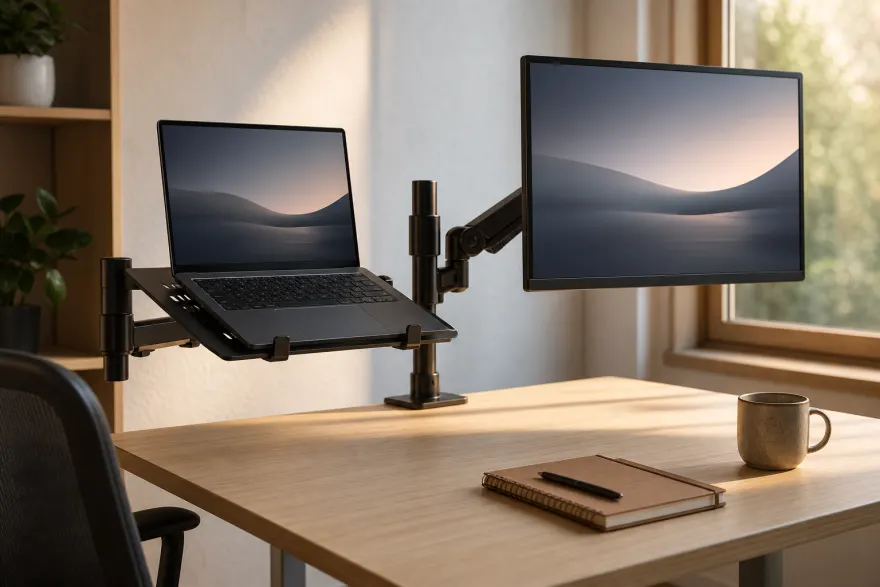
Laptop trays: a notebook on a monitor arm
A tray with standard rear holes bolts where a monitor would. Ventilated (perforated or open-frame) steel designs keep the fan intakes breathing; a front lip or strap keeps the laptop put when the arm tilts. Typical published specs: a 14 × 11.5-inch vented platform on a 100×100 mm plate for notebooks up to 17 inches — Ergotron's 75×75 mm tray goes to 17.3 inches. Weight math: tray plus laptop against the arm's per-screen rating — a light 100×100 arm handles nearly any notebook, but check the listing rather than assume. Dual-arm setups with a monitor on one side and a tray on the other are the common ergonomic win.
Tablet & iPad enclosures
An enclosure clamps around the tablet and presents 75×75 or 100×100 mm holes, so the tablet mounts like a small monitor — on an arm at a workstation, a wall bracket in a kitchen, or a pole clamp at a kiosk. Two families: universal spring-loaded holders covering roughly 7.5-to-10.3-inch tablets, and model-specific enclosures — the locking kiosk kind runs from 9.7-inch iPads up to 12.9-inch iPad Pros. Fit is model-specific in the second family: cutouts for cameras, buttons and connectors differ between iPad generations and Android sizes, so match the enclosure to the exact device, not just the inch count.
Shelves and speaker adapters
A VESA shelf hangs on the screen's own rear holes or sandwiches between screen and mount, putting a streaming box, game console or power brick behind the panel instead of on furniture — sandwich models cover patterns up to 400×400 mm with platforms around 18 × 10 inches. Keep the shelf's load limit honest and leave vents clear on both the device and the TV. Speaker and soundbar mounts do the same trick for audio, hanging a soundbar off the rear holes of roughly 23-to-65-inch TVs at ratings up to about 33 lb. In both cases the added weight counts against the mount that carries everything — the same margin logic as in the weight guide.
Keyboard trays on poles and carts
Rolling carts and pole-mounted workstations take clamp-on keyboard trays below the screen — standard in labs, shops and standing kiosks. These clamp to the pole rather than to VESA holes, so the spec to match is the pole diameter — published clamp ranges run to about 1-to-3.6-inch poles (the same check as for pole mounts) — plus enough clearance under the screen plate for wrists.
Mini-PC brackets: the hidden computer
Sandwich brackets install between the monitor's holes and the arm plate with a cage for an NUC-class mini PC or a Mac mini — the monitor stays mountable because the bracket passes the 75×75/100×100 mm pattern through, and published bracket ratings run to about 11 lb of computer. The result is a one-cable-look workstation with the computer invisible behind the panel. Check the cage's dimensions against the exact computer, and count monitor + computer + bracket against the arm's rating. Mac-specific notes live in the Apple VESA guide.
Quick-release plates
A two-part plate between mount and screen: one half bolts to the monitor, the other to the stand, and they slide and clip together — lift the screen off in seconds, no unbolting. Kits for 75×75/100×100 mm are the common case; larger versions reach 200×200 mm with tested ratings around 32 lb. Worth it for TVs that migrate between rooms (pair with a floor stand in the second room), monitors that alternate between arm and factory stand, and rental situations where the panel leaves but the bracket stays. The plate adds thickness between mount and screen — on recessed-hole TVs that may change the screw length you need (screw guide) — and its weight rating joins the chain: the weakest link carries the screen.
Double-check before buying
- Holes must match: 75×75/100×100 mm for arm-side accessories — verify your screen's pattern in the monitor database.
- Add up the load: tray + laptop, enclosure + tablet, shelf + console — the mount carries the total.
- Device-specific fit: tablet enclosures and mini-PC cages are sized for exact models, not categories.
- Quick-release and sandwich brackets add thickness — re-check screw length and cable clearance.
Frequently asked questions
Can I put a laptop on a monitor arm?
Yes, with a VESA laptop tray: a ventilated platform with 75×75/100×100 mm holes that bolts to the arm in place of (or under) a monitor. Most trays take 13–17-inch notebooks; the number to check is the arm's per-screen weight rating against tray plus laptop, and whether the tray has a lip or strap so the laptop can't slide off when the arm tilts.
How do I mount an iPad or tablet on a VESA arm?
With a VESA tablet enclosure — a clamshell holder with standard rear holes. Enclosures are sized for a screen-size range and often for exact iPad generations, since camera and button cutouts differ. Once the tablet is in the enclosure, it behaves like a tiny monitor: any arm, wall bracket or pole clamp covering 75×75/100×100 mm holds it.
What is a VESA quick-release plate?
A two-part plate that sits between the mount and the screen: one half stays on the mount, the other on the screen, and they latch together. It lets you lift a screen off in seconds — useful for TVs that move between rooms or monitors that alternate between an arm and a stand. It adds some thickness between mount and screen, and the kit's own weight rating becomes part of the chain.
Can I mount a Mac mini or mini PC behind a monitor?
Yes — sandwich-style brackets install between the monitor's VESA holes and the arm or stand plate, with a cage for the computer. The bracket passes the holes through, so the monitor stays mountable. Check the cage fits your exact computer model and that the arm's rating covers monitor plus computer plus bracket.
Is there a VESA shelf for a streaming box or console?
Yes — VESA shelves hang on the screen's rear holes (or sandwich between screen and mount) and hold streaming boxes, small consoles or a soundbar power brick behind the panel. Mind the shelf's load limit, keep vents clear, and remember everything on the shelf adds to what the wall mount or stand is carrying.
Sources
- VESA FDMI (MIS-D) standard — the 75/100 mm pattern these accessories share vesa.org
- VIVO STAND-LAP2 — vented VESA laptop tray (14 × 11.5 in, up to 17" laptops) vivo-us.com
- Ergotron 50-193-200 — 75×75 mm notebook tray (up to 17.3") ergotron.com
- VIVO STAND-VAD2H — quick-release plate to 200×200 mm, tested 32.2 lb vivo-us.com
- VIVO MOUNT-SF04R — sandwich VESA shelf (to 400×400 mm) vivo-us.com
- VIVO MOUNT-UVM02 — universal tablet-to-VESA holder (7.5–10.3 in tablets) vivo-us.com
- HumanCentric mini-PC VESA bracket — rated 11 lb (5 kg) humancentric.com
- Per-model monitor patterns and weights cited from manufacturer documentation in the monitor database.
Related: monitor arms, stands & adapters, floor stands, poles & tripods, and adapter plates when patterns don't line up.